

The Reality of the 2026 Security Environment
You probably woke up this morning and unlocked your phone with a quick glance at the sensor. It feels seamless. The technology behind that glance has changed significantly over the last few years. We moved past simple face ID into a world of continuous biometric mesh authentication. Your device now knows it is you based on how you hold the glass; it tracks your gait and even the micro-flickers in your retinas while you scroll through your morning feed. This level of convenience comes with a specific set of trade-offs that most users ignore until their data shows up on a dark web forum for three dollars. It happens more often than people think. You see it in the news every week. A major database gets breached and suddenly everyone is scrambling to reset their recovery codes. The problem is that you cannot reset your thumbprint or your iris scan. Once that biometric data leaks, it stays leaked. You need to change how you approach personal data silos before the next major breach hits your service provider.
The Transition to Zero-Knowledge Vaults
Most people still rely on cloud providers that claim to be secure but retain the ability to reset your password. If they can reset your password, they can access your data. This is a fundamental flaw in the traditional security model. You should transition your primary storage to zero-knowledge vaults. These systems ensure that only the user holds the decryption keys. The provider hosts the encrypted bits; however, they have no mathematical way to view the contents. You will want to look at services that utilize the latest AES-256-GCM encryption standards. Setting this up takes about twenty minutes. You download the client; you generate a master key phrase that you must never lose; and then you move your sensitive documents into the encrypted container. If you lose that master phrase, the data is gone forever. This is the price of actual privacy in 2026. There is no forgot password button in a true zero-knowledge system. It is a bit like the old days of physical safes where losing the key meant hiring a locksmith with a drill; only in this case, there is no locksmith who can help you.
Implementing Hardware Security Keys
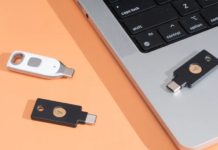
Software-based two-factor authentication is no longer sufficient for high-stakes accounts. You have seen the reports about SIM swapping and sophisticated social engineering attacks that bypass SMS codes. Even authenticator apps are vulnerable if your device OS is compromised. You need a physical hardware key. These devices use the FIDO2 and WebAuthn protocols to provide a hardware-backed cryptographic challenge that cannot be phished. You plug the key into your USB-C port or tap it against the NFC sensor on your phone. The server verifies the signature from the chip. This process eliminates the risk of an attacker redirecting your login attempt to a fake site. You should own at least two keys. You register the primary key to your accounts and keep the second key in a secure location like a desk drawer or a home safe. If you lose your primary key while traveling in Mumbai or London, you use the backup to regain access. It is a one-time purchase that effectively ends the threat of remote account takeovers.
Managing the Indian Digital Stack Securely
The digital infrastructure in India has become incredibly advanced. You use UPI for everything from buying a coffee at a stall to paying your monthly rent. The integration with Aadhaar and DigiLocker makes life convenient; it also creates a massive central point of failure. You should manage these links with extreme caution. Start by locking your Aadhaar biometrics through the official app. You only unlock them when you specifically need to authenticate for a new service or a bank update. This prevents someone from using your fingerprint data from a leaked database to verify transactions in your name. You also need to audit the permissions you give to third-party payment apps. Many of these apps request access to your contacts, location, and SMS history. They use this data to build a profile for credit scoring or targeted ads. You can deny these permissions in your system settings without breaking the core payment functionality. You should also check your bank’s notification settings. Ensure you get an alert for every transaction over one rupee. It sounds annoying at first; however, it is the only way to catch a small unauthorized drain before it turns into a large theft.
Browser Hardening and Metadata Scrubbing
Your browser is the primary window through which companies track your behavior. In 2026, tracking is not just about cookies. It is about browser fingerprinting. Websites look at your screen resolution, your installed fonts, and your hardware configuration to create a unique ID for you. You can mitigate this by using a hardened browser. You should disable WebRTC to prevent your real IP address from leaking even when you use a VPN. You should also enable strict tracking protection. Another often overlooked area is image metadata. When you upload a photo to social media, you might be sharing the exact GPS coordinates of your home. Most platforms strip this data now; but some smaller forums or direct messaging apps do not. You should use a local tool to scrub EXIF data before you share anything. It takes a few seconds and keeps your physical location private. You might think no one cares where you took a photo of your lunch; but an automated scraper can use that data to map your daily routine over several months.
The Problem with Modern Smart Home Devices
Your smart fridge and your voice assistant are potential security holes. These devices often run on outdated kernels with known vulnerabilities. They sit on your home network and can act as a bridge for an attacker to reach your laptop or phone. You should isolate these devices on a separate VLAN. Most modern routers allow you to create a guest network. Put your smart bulbs and your speakers on the guest network. This way, if someone hacks your smart toaster, they cannot access your personal files or your work computer. You should also audit the microphones in your house. Many devices have physical mute switches. You should use them. There is no reason for a smart display in your kitchen to be listening to your conversations while you are not using it. It sounds a bit paranoid; but data breaches in the smart home sector are becoming more common as these companies prioritize features over security patches.
Hardening Your Mobile Operating System
Your phone is the most personal device you own. It holds your banking apps, your private messages, and your location history. You need to go beyond the default settings. Start by turning off the feature that allows your phone to connect to known Wi-Fi networks automatically. This prevents your device from connecting to a malicious hotspot that is spoofing a common name like Airport_Free_Wifi. You should also review your app list every month. If you haven’t used an app in thirty days, delete it. Every app is a potential entry point for an exploit. You should also look at your notification settings. Ensure that sensitive information is not visible on the lock screen. You don’t want an OTP for your bank account to show up as a banner that anyone can read while your phone is sitting on a table. It is a small change that significantly improves your physical security. You also need to be aware of the 6G transition. New network standards often come with initial bugs. You should keep your system updates on automatic. Developers release patches for zero-day vulnerabilities frequently; delaying an update by a week can leave you exposed to a known threat that is already being exploited in the wild.
Dealing with Phishing in the AI Era
Phishing has evolved. In 2026, attackers use high-quality voice cloning and deepfake video to impersonate family members or colleagues. You might get a call that sounds exactly like your boss asking you to move a file or authorize a payment. The grammar is perfect; the tone is right. You need to establish out-of-band verification. If you receive an unusual request, contact the person through a different channel. Use a pre-arranged safe word for family members if you are particularly concerned. You should also be skeptical of any urgent request that requires you to bypass standard security protocols. Attackers rely on creating a sense of panic to make you ignore your training. They want you to act before you think. If an email says your account will be deleted in one hour unless you click a link, it is almost certainly a scam. High-reputation services do not operate that way. They give you days or weeks of notice and provide instructions on how to resolve the issue through their official website rather than a direct link in an email.
Final Steps for Digital Hygiene
Security is not a one-time setup. It is a set of habits. You should perform a digital audit every quarter. Check which devices are logged into your accounts. Revoke access for old phones or laptops you no longer use. Update your passwords for any service that does not yet support hardware keys. Ensure your recovery emails and phone numbers are current. It is easy to forget about an old email account; however, an attacker can use it to reset passwords on your more important profiles. You should also consider your physical security. If you carry a laptop in a public space, use a privacy screen. It prevents people from shoulder surfing while you type in your master password. These steps might seem like a lot of work; but they are necessary in a world where data is the most valuable commodity. You have to take control of your own security because the platforms you use are more interested in your engagement than your privacy. Stay sharp; keep your keys close; and don’t trust every prompt that pops up on your screen. The 2026 digital world is fast and efficient; it is also unforgiving if you leave the door unlocked.