




































If you’re in a conversation with someone on WhatsApp and you’re chatting most of the time so you can add WhatsApp chat shortcuts on the Android home screen for your own convenience.
If you add WhatsApp important contacts on the Android home screen, you can instantly open the chat by clicking on the WhatsApp chat shortcuts from the home screen.
You can save your time as well as it’s a convenient feature to use, also you can remove the chat shortcuts anytime.
Nowadays, WhatsApp is riches with new features that can be very helpful for you, if you know about it. Just like you can disable hide blue tick or you can change the font size in WhatsApp.
Even you can see Who viewed your WhatsApp profile, amazing isn’t it?
Related:
So, Let’s dive into the steps to learn How to Add WhatsApp Contact Shortcut on Android HomeScreen.
How to Add WhatsApp Chat Shortcuts on Android HomeScreen
Step 1. Open WhatsApp
 Open the WhatsApp application on your Android device.
Step 2. Select Contact
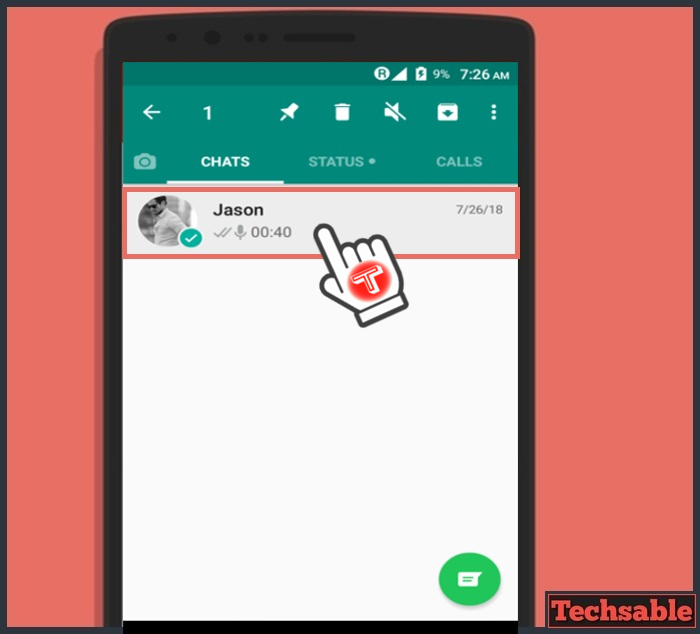
Tap and Hold the Contact for a second to select it. When you see a tick on the profile pic icon, it means this contact is selected.
Step 3. Click on Add Chat Shortcut
 Click on the three dots located in the upper right corner, then click on Add Chat Shortcuts.
Step 4. Shortcut Added

Now, the WhatsApp chat shortcut is added to the Home screen. Let’s check the HomeScreen.
Step 5. Contact Shortcut Appeared on the HomeScreen
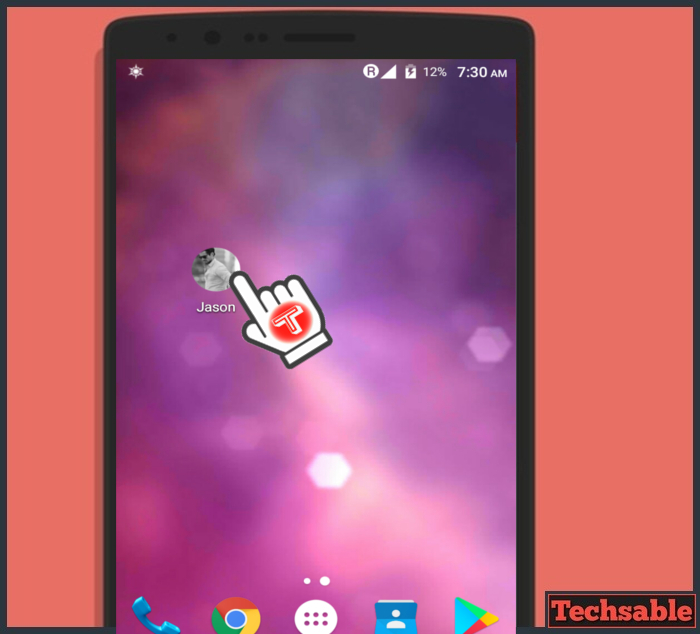 As you can see, a WhatsApp contact shortcut has appeared on the Android HomeScreen.
Now you don’t need to find out the contact on WhatsApp to chat with someone because you’ve already added a contact shortcut on Android Homescreen for easy access.